
- Open the PRISM+ Connect App.
- Select your Doorbell.
- Tap the Settings icon.
- Select Doorbell Settings.
0 of 2 steps complete~2 min remaining
Why Is My PRISM+ Doorbell Battery Draining Quickly?
If your PRISM+ Doorbell battery is draining faster than expected, adjusting a few settings in the PRISM+ Connect App can help improve battery life.
The recommended settings are:
| Setting | Recommended Option |
|---|---|
| Power Mode | Power Saving |
| Recording Settings | Event Recording |
| PIR Strength | Low |
| Video Quality | SD |
| Recording Indicator Light | Off |
Steps
- 1
- 2
Configure the following settings:
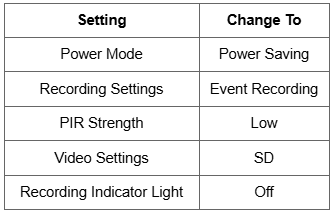
Recommended Configuration
| Feature | Recommended Setting | Benefit |
|---|---|---|
| Power Mode | Power Saving | Reduces overall battery usage. |
| Recording Settings | Event Recording | Records only when motion or events are detected. |
| PIR Strength | Low | Reduces unnecessary motion detections. |
| Video Quality | SD | Uses less battery during recording and playback. |
| Recording Indicator Light | Off | Minimises unnecessary power consumption. |
After Changing the Settings
Once you've updated the recommended settings:
- Allow the doorbell to operate normally for several days.
- Monitor whether the battery life improves.
These settings are designed to help extend battery life under normal usage.
Was this troubleshooting helpful?
Your feedback helps us improve every troubleshooting.Didn't find your answer?
No problem — send us the details below and a specialist will reply by email. Avg. response under 4 hours during business hours.