
PRISM+
Support Center Beta
0 of 5 steps complete~5 min remaining

Soundbar Subwoofer Not Pairing? Here's How to Reconnect It

PRISM+ Support teamUpdated 20 July 2026~5 min remaining5 steps

If your PRISM+ subwoofer is not pairing with your soundbar, it is usually caused by a pairing interruption, power issue, or the devices being out of sync.

Follow the steps below to reconnect your subwoofer.

Before You Begin

Ensure that:

  • The soundbar is powered on
  • The subwoofer is connected to a working power outlet
  • The subwoofer is placed within a few metres of the soundbar
  • There are no large obstacles between the soundbar and subwoofer

Steps

  1. 1
    1 min

    Locate the indicator light on the back or front of the subwoofer.
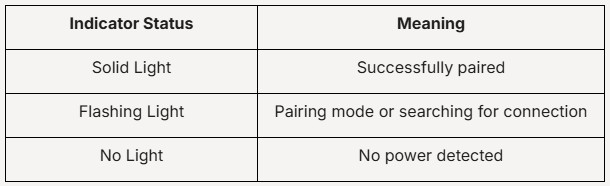
    If there is no light, verify the power connection before proceeding.

  2. 2
    1 min

    A simple restart can often restore the connection.

    1. Turn off the soundbar.
    2. Turn off or unplug the subwoofer.
    3. Wait 30 seconds.
    4. Turn the soundbar back on.
    5. Power on the subwoofer.
    6. Allow up to 1 minute for automatic pairing.

    If the devices reconnect, no further action is required.

  3. 3
    1 min

    If automatic pairing does not occur:

    • Put the Subwoofer into Pairing Mode
      • Locate the Pairing button on the subwoofer.
      • Press and hold the button for several seconds until the indicator light starts flashing rapidly.
    • Initiate Pairing
      • Ensure the soundbar remains powered on.
      • Wait for the devices to establish a connection automatically.

    Once paired successfully, the flashing indicator should become solid.
     

  4. 4
    1 min

    Wireless devices may occasionally affect pairing performance.

    Try the following:

    • Move the subwoofer closer to the soundbar
    • Keep the devices away from Wi-Fi routers
    • Avoid placing the subwoofer inside enclosed cabinets
    • Remove large metal objects between the devices
  5. 5
    1 min

    If pairing still fails:

    1. Turn off both devices.
    2. Repeat the manual pairing process from the beginning.
    3. Allow at least 60 seconds for the connection to be established.

Didn't find your answer?

No problem — send us the details below and a specialist will reply by email. Avg. response under 4 hours during business hours.