
Check that:
- The soundbar power indicator is lit
- The soundbar is connected to a working power outlet
- The volume is turned up
Try adjusting the volume using the soundbar remote control.
If your PRISM+ Soundbar is connected to your PRISM+ TV via cable but no audio is playing, the issue is usually caused by an incorrect input source, cable connection, TV audio settings, or a faulty cable.
Follow the steps below to restore audio.
Check that:
Try adjusting the volume using the soundbar remote control.
Your soundbar must be set to the same input type as the cable being used.
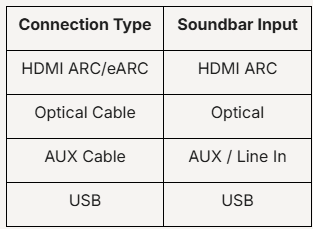
Use the Source/Input button on your soundbar remote to switch to the correct source.
Ensure both ends of the cable are securely connected.
If available, try another cable to rule out a cable issue.
On your PRISM+ TV:
Ensure:
A temporary communication issue can sometimes prevent audio from being transmitted.
Try:
This helps determine whether the issue is with the soundbar connection or a specific application.
Was this troubleshooting helpful?
Your feedback helps us improve every troubleshooting.No problem — send us the details below and a specialist will reply by email. Avg. response under 4 hours during business hours.