
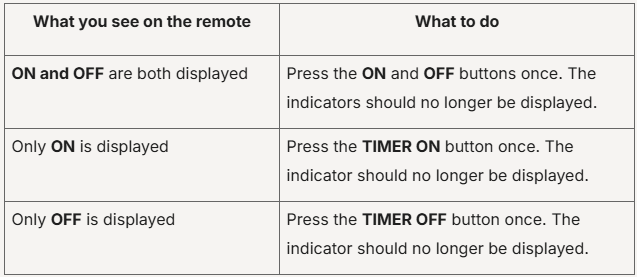
First, check the display on your Aircon remote. Look for ON, OFF, or both ON and OFF indicators.
Once the relevant indicator has been cleared, check whether your Aircon responds to commands from the PRISM+ Connect App.
If your PRISM+ Aircon is not responding to commands from the PRISM+ Connect App, check the Aircon remote control and any active routines in the app.
First, check the display on your Aircon remote. Look for ON, OFF, or both ON and OFF indicators.
Once the relevant indicator has been cleared, check whether your Aircon responds to commands from the PRISM+ Connect App.
If the Aircon is still not responding, check whether you have any routines set up for your Aircon in the PRISM+ Connect App.
An active routine may automatically control the Aircon according to its configured settings.
After switching off or deleting any relevant routines, try controlling your Aircon through the app again.
If the Aircon is still not responding after completing these checks, contact PRISM+ Customer Support for further assistance.
Was this troubleshooting helpful?
Your feedback helps us improve every troubleshooting.No problem — send us the details below and a specialist will reply by email. Avg. response under 4 hours during business hours.