
PRISM+
Support Center Beta
0 of 4 steps complete~4 min remaining

My Soundbar Is Connected, but Sound Is Still Coming from the TV. What Should I Do?

PRISM+ Support teamUpdated 10 September 2026~4 min remaining4 steps

f your Soundbar is connected to your TV but audio is still playing through the TV speakers, this may be caused by a connection or TV setting issue.

Follow the steps below to troubleshoot the issue.

Steps

  1. 1
    1 min

    First, confirm that your TV supports the connection method you are using.
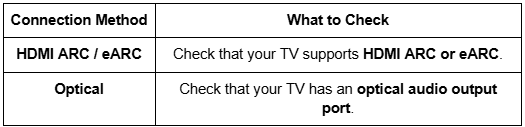
    Soundbar troubleshoot

  2. 2
    1 min

    If you are connecting your Soundbar through HDMI, make sure HDMI CEC is enabled on your TV.

    HDMI CEC allows the TV and Soundbar to communicate with each other.

    How to Enable HDMI CEC

    1. Press the Settings button on your TV remote.
    2. Go to Settings using the gear icon.
    3. Select Channels and InputsInputs.
    4. Select HDMI Control.
    5. Set HDMI Control to On.

    Note: The menu names and locations may vary depending on your TV model.

  3. 3
    1 min

    Make sure your Soundbar is connected correctly.

    • Check that the HDMI or optical cable is firmly connected to both the TV and Soundbar.
    • If using HDMI, make sure the cable is connected to the TV's ARC/eARC port.
    • If possible, try using a different HDMI or optical cable to rule out a faulty cable.
  4. 4
    1 min

    A power cycle can help clear temporary connection issues.

    1. Turn off the TV and Soundbar.
    2. Disconnect the Soundbar from the TV.
    3. Unplug the TV, Soundbar, and Subwoofer from the power source.
    4. Wait 5 minutes.
    5. Plug all devices back into the power source.
    6. Reconnect the Soundbar to the TV.
    7. Turn on the Soundbar and TV and check the audio output.

    Tip: After reconnecting the devices, check whether the audio is now playing through the Soundbar.

Didn't find your answer?

No problem — send us the details below and a specialist will reply by email. Avg. response under 4 hours during business hours.