
Verify the Wi-Fi network that your mobile device is connected to.
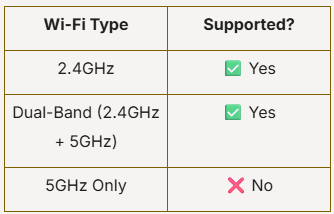
If you are using a dual-band router, ensure that the 2.4GHz band is enabled.
PRISM+ ceiling fans only support 2.4GHz Wi-Fi networks.
They are not compatible with 5GHz-only Wi-Fi networks.
If your router is broadcasting only a 5GHz network, the ceiling fan will not be able to connect.
Verify the Wi-Fi network that your mobile device is connected to.
If you are using a dual-band router, ensure that the 2.4GHz band is enabled.
During setup, your smartphone should also be connected to the same 2.4GHz network that the ceiling fan will use.
Some routers combine both frequency bands under a single Wi-Fi name (SSID). If pairing fails, you may need to temporarily separate the 2.4GHz and 5GHz bands through your router settings.
If you are unsure how to do this:
Try restarting:
Once restarted, attempt the pairing process again.
Ensure that the ceiling fan is in pairing mode before attempting to connect through the app.
For detailed pairing instructions, please refer to the App Pairing Guide.
Was this troubleshooting helpful?
Your feedback helps us improve every troubleshooting.No problem — send us the details below and a specialist will reply by email. Avg. response under 4 hours during business hours.