
Place the charging dock:
- Against a flat wall
- On a level surface
- Near a stable Wi-Fi signal
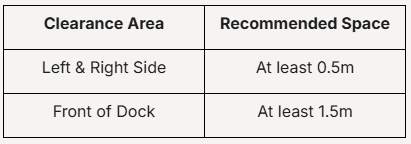
For best performance, leave:
Avoid placing the dock:
❌ Near stairs
❌ Behind furniture
❌ In direct sunlight
❌ On thick carpets
Please ensure the following:
✓ Your NanoBot is fully assembled
✓ The charging dock is plugged into a power outlet
✓ Your mobile device is connected to a 2.4GHz Wi-Fi network
✓ Bluetooth is enabled on your mobile device
✓ The PRISM+ Connect App is installed and updated
Place the charging dock:
For best performance, leave:
Avoid placing the dock:
❌ Near stairs
❌ Behind furniture
❌ In direct sunlight
❌ On thick carpets
Recommended: Fully charge the robot before starting the initial mapping process.
This indicates the NanoBot is ready to connect.
Once connected successfully, your NanoBot will appear in the PRISM+ Connect App.
For the most accurate mapping:
✓ Open all room doors
✓ Remove loose cables and obstacles
✓ Ensure adequate lighting
✓ Keep pets and children away during mapping
Allow the NanoBot to complete its first cleaning and mapping cycle without interruption.
Check that:
Try the following:
This may occur if:
Run another cleaning cycle to allow the map to update.
Once setup is complete, you can:
Was this guide helpful?
Your feedback helps us improve every guide.No problem — send us the details below and a specialist will reply by email. Avg. response under 4 hours during business hours.