
Understanding Fast Boot
Answers to the things customers ask most. Search for a keyword, or browse the list below to jump to your answer.
Fast Boot allows your Android TV to start up within a few seconds by placing the TV into Standby Mode instead of completely shutting it down.
If you use your TV frequently, enabling Fast Boot can provide a faster and more convenient startup experience. However, we recommend performing a full shutdown at least once a week to help maintain optimal performance.
What Is Fast Boot?
Fast Boot is a feature that keeps essential system processes running in the background while the TV is in standby mode.
Instead of going through the full startup process each time you turn on the TV, Fast Boot allows the operating system and startup applications to load almost instantly.
Benefits of Fast Boot
| Benefit | Description |
| Faster Startup | TV powers on within seconds |
| Improved Convenience | No need to wait for a full system boot |
| Better User Experience | Faster access to apps and content |
How Does Fast Boot Work?
When Fast Boot is enabled:
- Turning off the TV places it into Standby Mode
- The TV can power on much faster than a normal startup
- The TV is not completely powered off\
- Some system resources remain active while in standby
Do I Need Fast Boot?
| If You... | Recommendation |
|---|---|
| Use your TV daily | ✅ Enable Fast Boot |
| Prefer faster startup times | ✅ Enable Fast Boot |
| Rarely use your TV | Optional |
| Prefer a complete shutdown every time | ❌ Leave Fast Boot disabled |
How to Enable Fast Boot
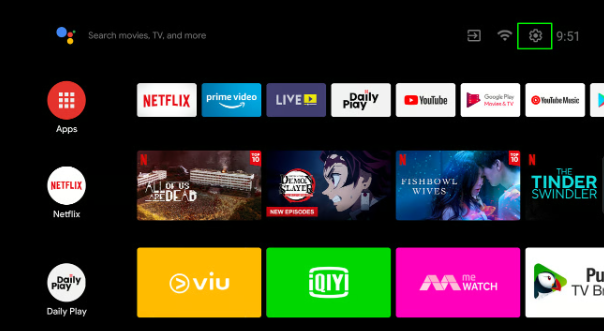
Step 1: Open Settings
From the Home screen, select Settings (⚙️ icon in the top-right corner).
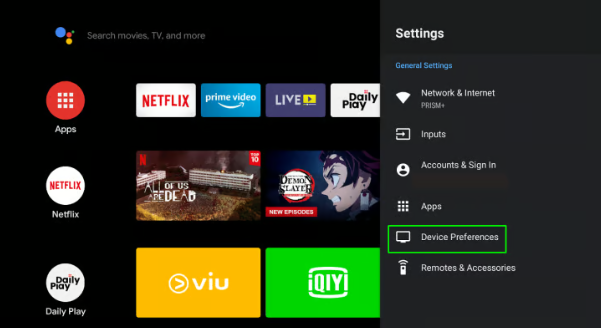
Step 2: Open Device Preferences
Select Device Preferences.
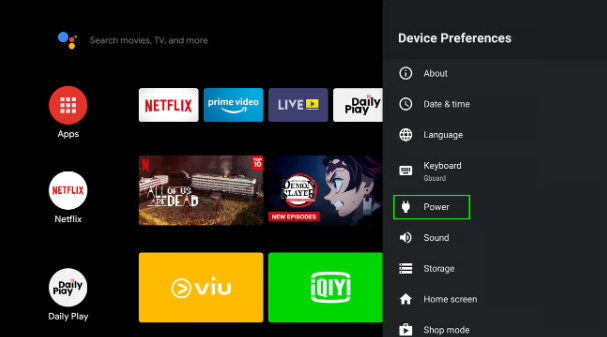
Step 3: Open Power Settings
Select Power.
Step 4: Enable Fast Boot
Toggle Fast Boot to On.
Was this faq helpful?
Your feedback helps us improve every faq.Didn't find your answer?
No problem — send us the details below and a specialist will reply by email. Avg. response under 4 hours during business hours.